Skip to content

PC diagnostics and reporting software

Computer Info Bits PC Reporter

One standalone Windows 11 application for hardware info, thermals, storage health, driver status, power profile, and performance diagnosis -- without switching between multiple tools.

Free, no trial or paywall Standalone Windows executable System, thermal, memory, and drive reporting HTML or PDF export output Visual drive map for selected storage devices
Download Standalone Version

Free. No ads, no trial, no paywall, no feature locks.

Version 1.0.10 · 74 MB · Windows 11 (64-bit)

Platform

Windows 11

Delivery

Standalone EXE

Export output

HTML or PDF

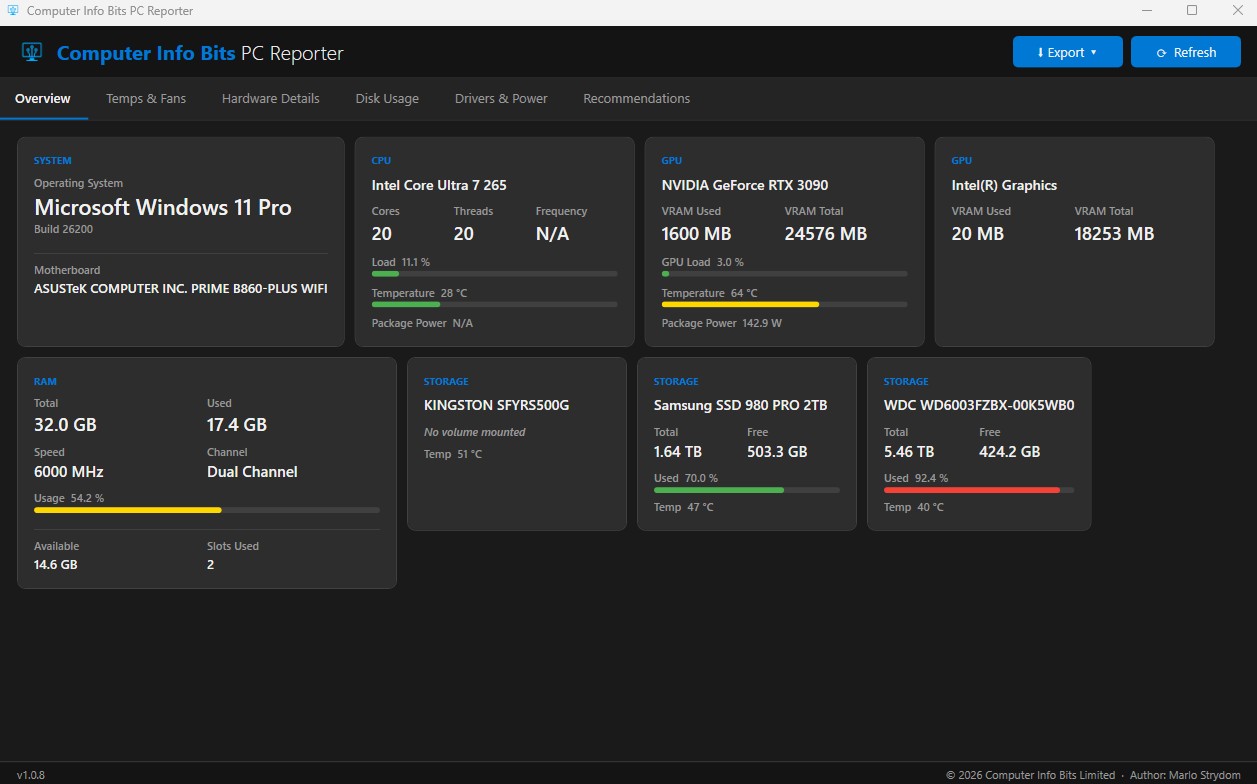
PC Reporter Overview tab showing CPU, GPU, RAM, motherboard, and storage health for a Windows 11 PC
The Overview tab gives you a one-glance look at the system, including CPU and GPU temperatures, RAM channel mode, and SMART-based drive health.
Share this software:

A single interface for Windows 11 system reporting

PC Reporter is a standalone Windows 11 application that consolidates hardware identification, temperature monitoring, storage health, driver inspection, power profile analysis, and performance diagnosis into a single tool, with HTML or PDF report export.

System identity, thermal behavior, storage condition, upgrade clues, driver warnings, and shareable report output are brought together in a single workflow, so you spend less time jumping between separate utilities to get a snapshot of a machine.

Feature modules

Each module is aimed at making PC inspection faster, clearer, and easier to share.

System Summary

Displays CPU, GPU, RAM, motherboard, and operating system details in one quick overview.

Thermals

Tracks available temperatures, detects throttling behavior, and reports fan speeds where supported.

Memory Analysis

Checks RAM speed, timings, and whether memory is running in single or dual channel mode.

Storage Health

Reads SMART data, reports TBW where available, and estimates remaining lifespan for supported drives.

Performance Diagnosis

Flags likely bottlenecks and suggests practical upgrade paths based on the system profile.

Driver Status

Highlights missing or aging drivers that may affect stability, compatibility, or performance.

Power Profile

Shows the current Windows power plan and whether it may be restricting system performance.

Report Export

Exports reports in HTML or PDF format for sharing, archiving, or support workflows.

Drive Map

Provides a visual map of the selected drive for a clearer view of layout and storage structure.

Where PC Reporter fits best

PC troubleshooting

Quickly verify whether temperatures, power settings, memory layout, or old drivers are contributing to poor performance.

Support and servicing

Generate a clear report before and after repairs, upgrades, or maintenance work.

Upgrade planning

Use bottleneck signals, storage health, and system summaries to decide what should be upgraded first.

Inventory and documentation

Capture system specifications and drive information in a format that is easy to store or send to others.

What PC Reporter is good at

The app helps you confirm whether a machine is thermally constrained, storage-limited, misconfigured at the memory level, or running on a Windows power plan that is holding back performance. It also flags aged or missing drivers and ties those findings into a report you can export for support handoffs or your own records.

Frequently asked questions

What does Computer Info Bits PC Reporter do?

It is a Windows 11 application that combines hardware identification, temperature monitoring, storage health checks, performance diagnosis, and exportable reports in one desktop tool.

Is the software really free, or is there a paid version?

Yes, it is genuinely free. There are no ads, no trial period, no paywall, and no feature unlocks. The download is the full application.

Does it show CPU and GPU temperatures?

Yes. The thermals module reports available temperature data, flags throttling conditions, and shows fan speeds when the underlying hardware exposes those sensors.

Can it check SSD and hard drive health?

Yes. The storage health section reads SMART information, surfaces TBW data when supported, and can estimate lifespan to help identify aging or risky drives.

Does the software support Windows 11?

Yes. The current target platform is Windows 11, delivered as a standalone executable.

Can reports be exported and shared?

Yes. Reports can be exported as HTML or PDF, which is useful for support handoffs, documentation, and record keeping.

What makes the drive map useful?

The drive map gives a visual view of the selected drive, helping you inspect storage layout more quickly than reading raw figures alone.

Why one tool instead of several separate utilities?

Running separate applications for hardware info, temperatures, storage health, and driver status means switching between interfaces and piecing together findings manually. PC Reporter consolidates those areas into a single workflow.
Found a bug or want a specific feature?

Use the contact page to report a bug or request a specific feature or reporting improvement.

Contact Us